
Play MonsterBox v1- Plant Island incredibox Game
Sprunki Popular Characters
All 20 Characters




Sprunki Popular Character Ranking
Oren - Beat Character
Sky - Effect Character
Durple - Melody Character
Wenda - Vocal Character
Tunner - Melody Character
Trending Games


























MonsterBox v1- Plant Island incredibox
Monsters revealed on a landscape stage
Plant Island starts with a row of pale long-haired empty figures against a green-yellow landscape. Assigning choices reveals much larger monster designs, including a red mushroom-like figure and a broad green tree-like creature with round eyes. A RARE readout appears at the upper left.
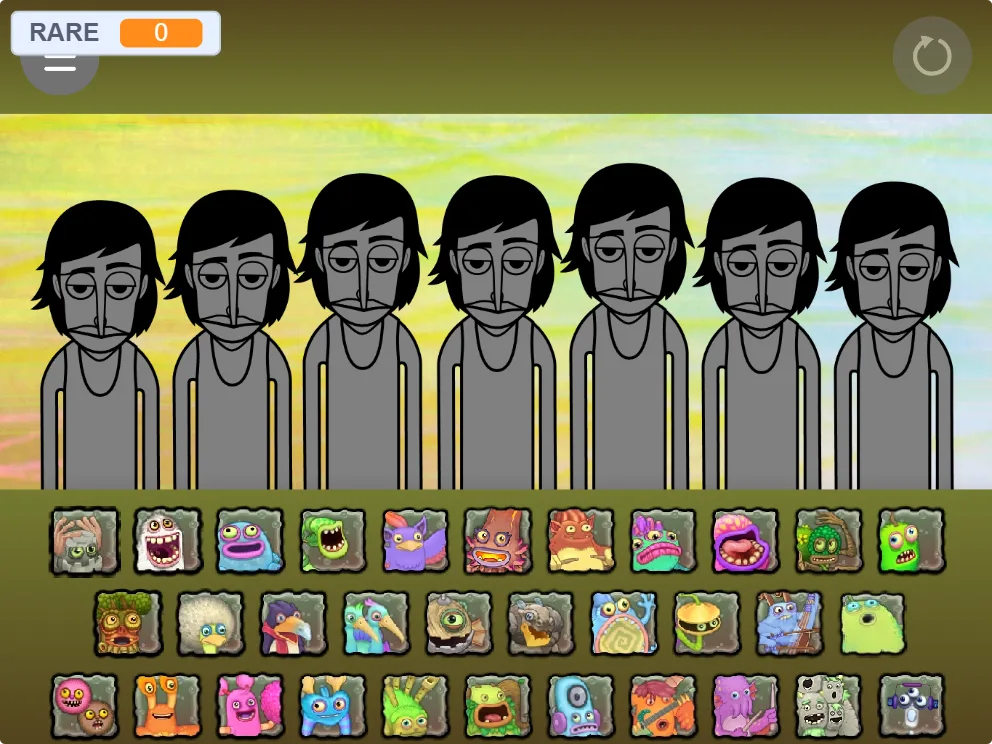
Use the monster portraits below
Choose a small illustrated monster tile and drag it onto an unused stage figure. Add one selection, inspect the resulting design, then place a different portrait on another position. Several rows of small portraits extend across the sound panel, giving more visual choices than a basic two-row mixer.
Allow room for large performers
The tree-like monster occupies much more space than an empty figure and can hide parts of neighboring bodies. Learn its tile while the rest of the stage is mostly clear. Build a small group before exploring later rows so the individual portraits and resulting monsters remain easy to associate.