
Play Gyatt Burger Game
Sprunki Popular Characters
All 20 Characters




Sprunki Popular Character Ranking
Oren - Beat Character
Sky - Effect Character
Durple - Melody Character
Wenda - Vocal Character
Tunner - Melody Character
Trending Games


























Gyatt Burger
Inside Abgerny - Gyatt Burger
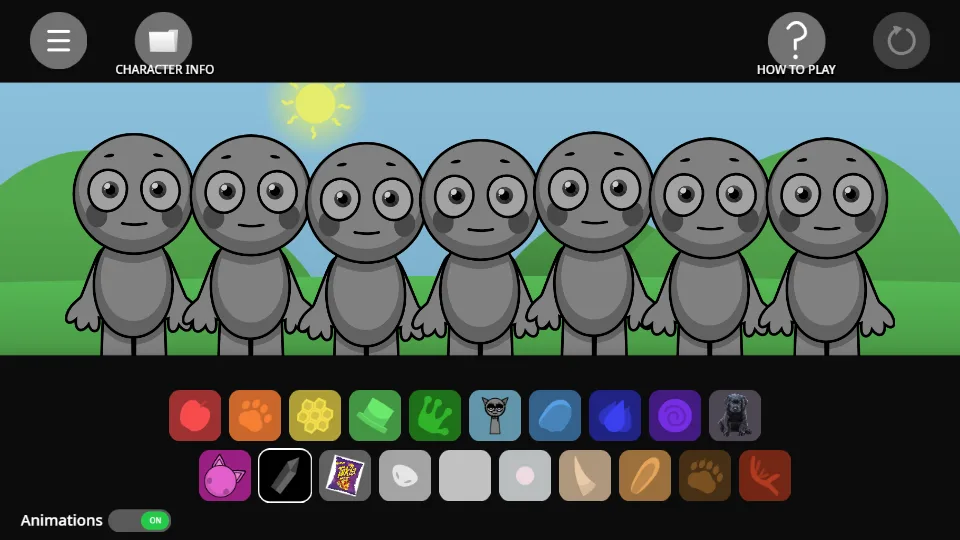
Gyatt Burger opens the project titled “Abgerny - Gyatt Burger”. The captured stage uses a wide landscape view, seven gray animal-shaped performers, and two rows of colorful object icons. An apple, paw print, honeycomb, hat, and other shapes identify its parts. This is a different lineup from the familiar orange-headphones Sprunki stage.
Use the two help controls
At the top of the stage, Character Info opens character information and How to Play provides the project’s own instructions. Begin there if an object icon is unfamiliar. The reset arrow is at the upper right; an Animations switch is visible at the lower left of the captured interface.
Try an apple-led arrangement
Drag the apple-shaped icon onto the first performer, then choose a second object icon for the next position. Hear the first part by itself before building the pair. The carousel shows an early arrangement with a red apple character and a small dog image, followed by a fuller stage.
Compare one additional icon at a time. The loaded project separates beat, effect, melody, and voice sprites, so a familiar object shape can still produce a different role from the sound you expected.
Compare the interface with Sprunki
Use Gyatt Burger when you want to explore Abgerny’s animal and object presentation. Use the main Sprunki player when you want the named Oren, Sky, and Pinki lineup. Keep each game’s help and icon mapping with its own stage; the two experiences are easier to learn when you compare their actual controls.
Start with this two-part mix
To reproduce the first pair tested in Gyatt Burger, drag upper-row icon 1 onto the first performer from the left. Next, place upper-row icon 10 on the second performer. Both drops activated a separate part, combining a rhythm selection and a effect selection.
Build the five-part arrangement
Continue the Gyatt Burger arrangement with upper-row icon 5 on performer 3, lower-row icon 5 on performer 4, and lower-row icon 8 on performer 5. Add them in that order to reach five active parts. Two of the 7 positions remain open for another choice.
The selected parts include the rhythm group, the effect group, the melody group, and the voice group. Keep the first pair in place while comparing one additional part; the table gives each selected icon’s location and stage position.
| Add in order | Sound choice | Performer position |
|---|---|---|
| 1 | upper-row icon 1 · rhythm 1 | first from the left |
| 2 | upper-row icon 10 · effect 5 | second from the left |
| 3 | upper-row icon 5 · rhythm 5 | third from the left |
| 4 | lower-row icon 5 · melody 5 | 4th from the left |
| 5 | lower-row icon 8 · voice 3 | 5th from the left |