












Play Sprunki Lore Mod Game
Sprunki Popular Characters
All 20 Characters




Sprunki Popular Character Ranking
Oren - Beat Character
Sky - Effect Character
Durple - Melody Character
Wenda - Vocal Character
Tunner - Melody Character
Trending Games


























Sprunki Lore Mod
A moving lineup on a bright stage
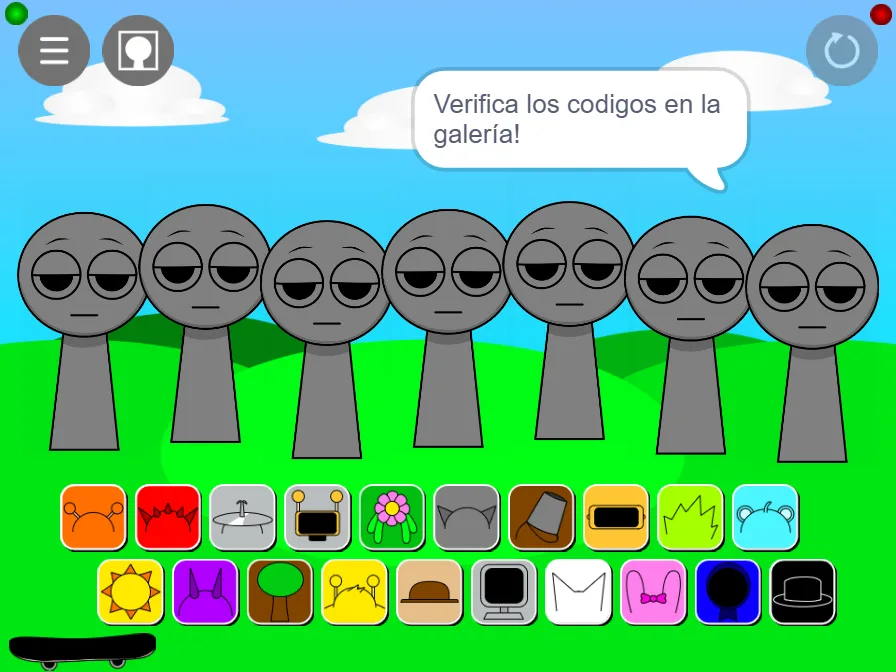
Sprunki Lore Mod uses a blue sky, white clouds and vivid green hills behind seven gray performers. Their heads tilt and their bodies shift as the scene animates. The toolbar has a menu and portrait symbol at the upper left, a circular-arrow control at the upper right, and small green and red indicators in the corners. Twenty colored accessory tiles sit in two rows below the stage.
Begin with headphones and the cyan bear
The first captured pair uses the orange tile at the left end of the upper row and the cyan bear tile at its right end. Drag each choice onto a free gray performer and check the resulting character before adding the next. The orange performer wears headphones; the cyan performer has round ears. In this build the figures can move close together, so follow an available gray head as it moves and release your tile when that figure is clear.
Add flowers, the brown hat and rabbit ears
The later screenshot adds the flower tile, fifth in the upper row, followed by the brown hat, fifth in the lower row, and pink rabbit ears, eighth in the lower row. The resulting group includes a green flower-haired performer, the tan hat-wearing figure and the pink rabbit. Two gray figures remain at the right. Add each choice separately and look for the changed accessory; the green and cyan figures overlap in the captured arrangement.
Read the gallery prompt
The opening speech bubble says “Verifica los codigos en la galeria!”, inviting you to check codes in the gallery. Use the portrait-shaped toolbar symbol when exploring that part of the interface, and read the instructions shown there. The three screenshots here provide a starting reference: the empty animated lineup, the headphone-and-bear pair, and the five-character group. Fullscreen gives the moving heads and the two accessory rows more room when you are playing on a narrow display.