

Play Punch Oren Game
Sprunki Popular Characters
All 20 Characters




Sprunki Popular Character Ranking
Oren - Beat Character
Sky - Effect Character
Durple - Melody Character
Wenda - Vocal Character
Tunner - Melody Character
Trending Games


























Punch Oren
Oren reacts to repeated clicks
Punch Oren Clicker places a large orange headphone character on bright hills. A Punches! counter and small reaction message appear at the upper left. As the count rises, Oren’s eyes and pose change, including a leaning response with large dark eye shapes.
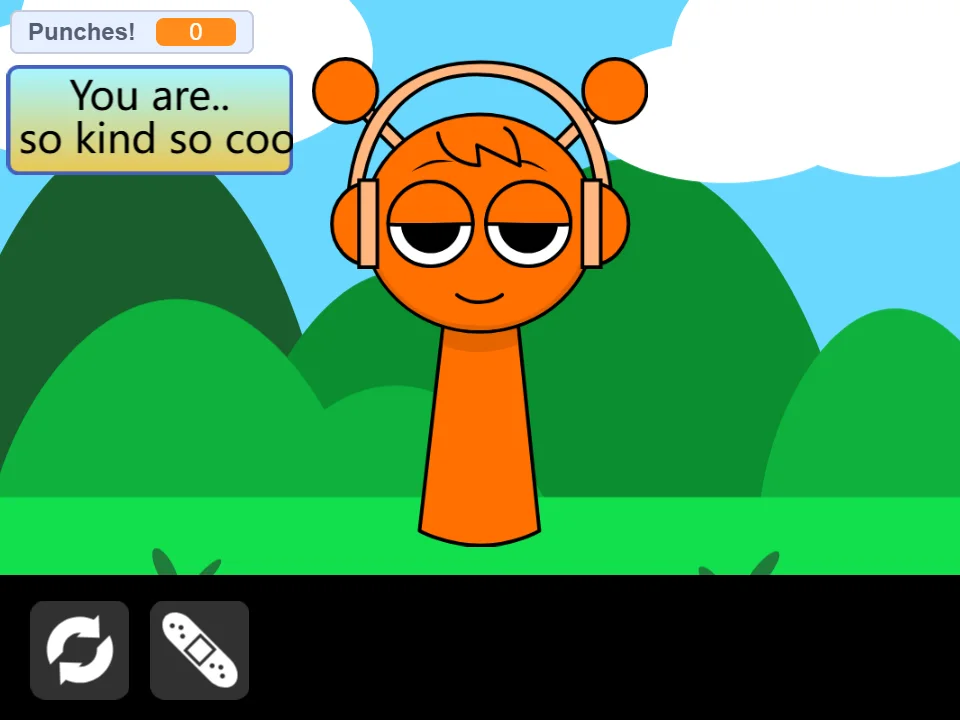
Click the character and watch the counter
Select Oren repeatedly and check the number after each short group of clicks. The example progresses from zero to twelve punches, with both the face and message changing. The lower-left controls include a circular-arrow symbol and a bandage-like icon.
Compare reactions gradually
Pause between small groups of clicks so you can see which expression appears at the current count. Keeping the counter in view helps associate a visible reaction with the amount of interaction. Use the screenshots to recognize the starting face and one later response, then explore further at your own pace.