Sprunki Mustard vs Katchup: Two Builds Compared
Mustard and Katchup both build a strong visual identity around one color, but they open different projects with different icon selections. This comparison uses the actual players and screenshots inspected on 2026-11-18, so you can choose which build to explore first.
Identify the two projects
The Mustard page loads “Incredibox Sprunkstard [If sprunki were in mustard]”. The Katchup page loads “Incredibox - Sprunki Version Katshup remix”. These titles identify the embedded builds behind the shorter names used in the game directory. Open the two game pages side by side for a direct comparison.
Keep the comparison tied to those two sources. Other projects can reuse Mustard, Katchup, or a numbered variant in their names. A similar label can help you discover a game, while the actual title and captured stage tell you which version you have in front of you.
Mustard: a striped yellow stage and an extra row
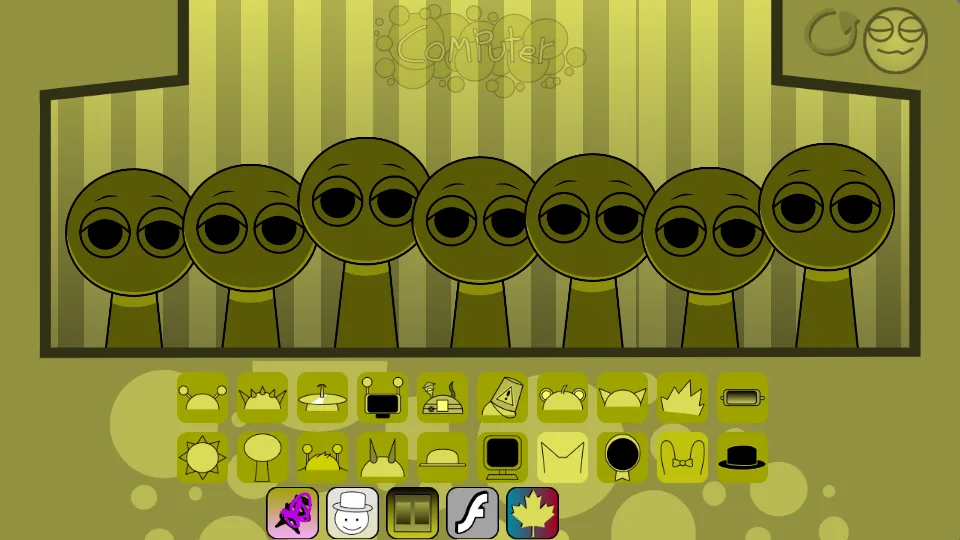
The inspected Mustard stage has a yellow-and-olive palette, vertical stripes, and seven performer positions. Its matching yellow icon tiles make silhouette more useful than color for locating a part. Headphones, a cymbal, a flower, a monitor, and a hat remain useful visual cues.
Two longer icon rows are followed by a short third row. The inspected package separates beat, effect, melody, voice, and Allstar sprite groups. Melody assets include trumpet- and guitar-labeled material, and the voice group includes vocal-chop material. Begin with a small pair before exploring the shorter extra row so you can hear what each new choice contributes.
Katchup: a red landscape and an expanded lineup
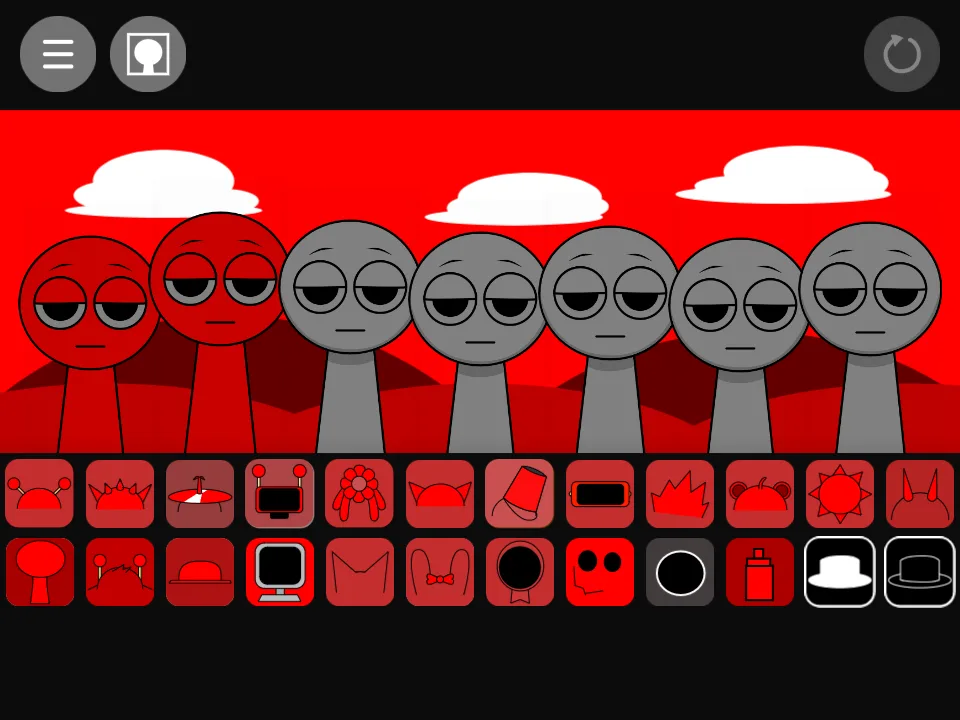
Katchup uses a bright red outdoor scene with white clouds and red hills. Familiar accessories share two expanded rows with additional character icons. Much of the selection is red, so tracking the headphone or flower shape is more practical than searching for the main player’s original character color.
The loaded roster includes extra names such as Ghefik, Missing, Apple, and Robot. These extra parts give the remix something concrete to explore beyond recoloring. Start with a familiar accessory, then add one of the extra icons against it. Keep the first part unchanged while you learn the new sound.
Try the same listening method in both
Find one recognizable accessory in each game and place it on the first stage position. Hear its complete phrase. Add one contrasting part to a second position and compare with the first sound alone. This method works even when the remixes use different names or replace a familiar character’s source audio.
Write down the icon shapes rather than assuming the same row position always means the same sound. The expanded selections change the layout, and Mustard’s short extra row has no direct visual equivalent in Katchup’s two-row arrangement. Once you have a recognizable pair, compare how an unfamiliar extra icon changes it.
Choose by the experience you want next
Try Mustard first when you want its striped indoor presentation and the extra row of choices. Try Katchup first when you want the red outdoor stage and additional named performers. Both are suitable for the small-pair listening exercise; neither requires filling all seven positions to begin exploring.
Keep your notes separate for each build and return to the main Sprunki player when you want the original bright-landscape reference used by our character guides. A useful mod comparison records its interface, the sounds you selected, and the result of changing one part. That gives you a reason to return to a version beyond remembering which color its thumbnail used.