Which Sprunki Version Am I Playing?
A directory name, an embedded project title, and a familiar character portrait can point to different parts of a fan-made release. Use the current title, stage layout, and selected sound to identify the version you are playing before comparing it with another mod.
Begin with the player title
On Sprunkin, each tested game introduction identifies the build it describes. A short source note beneath the introduction names the player host and, where available, the gameplay test date. Open two game pages in separate tabs when comparing builds so you can keep each arrangement in place.
The main source reports “Sprunki Incredibox Game | Sprunki.com”. The Retake listing currently reports “Sprunki Retake (1)”. The Deluxe listing opens “Sprunki But Disturbing26”. Those are concrete references for the builds we inspected, even where a game directory uses a shorter or more familiar title.
Match the stage and icon layout
The main normal stage uses a bright sky, green landscape, seven performer positions, and two rows of icons. Retake’s captured normal stage has a paler sky and a gray toolbar with revised icon drawings. The Deluxe source retains the bright landscape but includes different icon shapes, such as a clock-like tile and a halo-topped shape.
The OC II testing source reports “SPRUNKI WITH OC II TESTING (28)”. Its expanded selection includes extra symbols and word-based tiles alongside the familiar accessories. The captured normal stage also has a yellow sun. These details let you recognize the build at a glance without assuming every game with OC in its title uses the same roster.
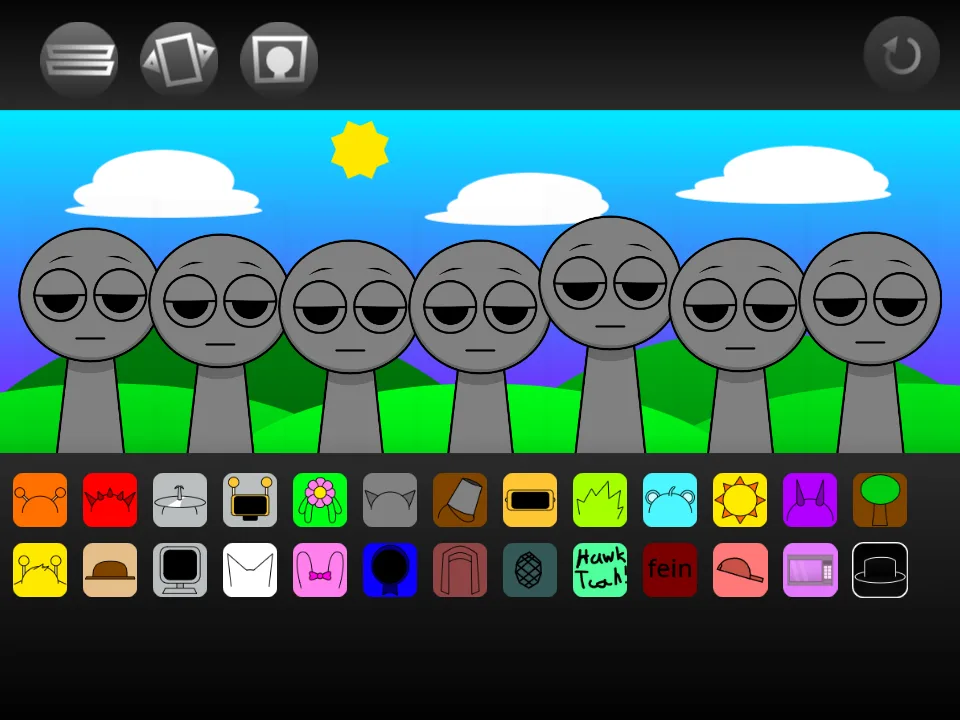
Use one familiar part as a sound reference
A recognizable headphone or bow icon gives you a starting point, but a remix can replace the associated audio. Choose one familiar slot and hear it alone, then compare that same choice in the main player. Keep other parts off so the difference is attributable to the sound you are testing.
Hysteria illustrates this clearly. Its loaded Oren pair is tum/tum2, and its Gray pair is bzzzz/bzzzz2, rather than the main build’s kick and bass pairs. Mustard uses the Sprunkstard title and a separate yellow layout. The project identity and the listening result together tell you more than a shared character name.
Keep numbered phases separate
The Phase 3 and Phase 4 pages here load separate sources. Their screenshots show the corresponding builds, and the Phase 4 capture has a nearly black scene with red-lit controls and altered performers. Open each independently and begin with a small arrangement before comparing a fuller stage.
A phase number is useful for locating a listing. To establish an update history or a continued story, look for a dated description from the creator of the particular project. Artwork and numbers can be compared as visible features without turning them into a release chronology. Keep the game page and exact project title with any notes you make.
Make a version note you can reuse
A practical note needs four details: the page you opened, the reported project title, the date you checked it, and the two icons used for your comparison. Add a screenshot when the interface has a distinctive layout. You can then tell whether a later visit opens the same project or presents changed artwork or controls.
Treat creator credits separately from a hosting domain. A host tells you where the player loads; the creator should come from the project’s own description or an attributable original page. This distinction keeps your notes useful when a creator’s work is distributed through several hosting sites.